Thought Flow

Tag: Chrome

  • Times New Roman versus Georgia font types

    Note: This blog post is a rare example of an opinion/observation that is no longer relevant and/or represent my current views, but I’m keeping it here for historical reasons :-)


    It seems that at the moment, the Georgia font type is winning the font race on the internet. But even for fonts, one has to ask whether or not the choice of font is good for cross-platform/browser compatibility. I was making some small changes to my business website the other day and I wanted to use the Georgia font since it is a well-designed and pleasant-to-look-at font. But on Ubuntu, the font is apparently missing… or so it seems. In fact, Firefox and Chrome renders the font in different ways. Firefox properly shows the Georgia font (or some version of it at least) while Chrome falls back and uses Times New Roman for almost all its serif fonts, as illustrated in the screenshot below.
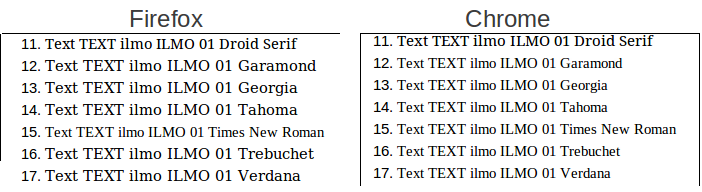
    Firefox and Chrome font comparison
    Notice that the Georgia font is quite a bit bigger than Times New Roman. I use Chrome for my everyday needs and thus, a ton of websites appear to have a (too) small font size because they use the Georgia font. I think this is unfortunate and that’s why I have chosen to go back to the roots and use Times New Roman for my business website. Maybe you should too.

    Here is a link to the document with the different fonts.

    Update: I noticed that the screenshot is also rendered differently in Chrome and Firefox. In Firefox, it looks horrible on my screen until I click on it. Makes me happy that I’m using Chrome

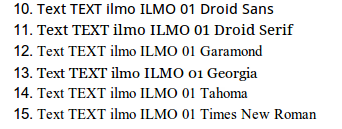
    Update: Sometime during an upgrade of either Ubuntu or Chrome, I now seem to have the Georgia font or at least som version of it. See below
  • Dual language spell checking in Chrome and Mac OS

    Mac OS has a built-in spell checker. So does Google Chrome. This has caused confusion for me recently but the problem is now solved.

    For example, at the end of an email, we often write “Med venlig hilsen” in Danish which means something like “With kind regards”. Chrome underlines “venlig” with a red line, indicating a miss-spelled word, even when I have chosen Danish as the language in Chrome. When right-clicking the word, Chrome then suggests “venlig” (i.e. exactly the same word) as an alternative. Puzzling.

    It turns out that the underline is actually due to Mac OS’ spell checker and not Google Chrome’s. And the language of the spell checker in Mac OS is set to “Automatic by language”. Obviously, it does not do a good job at detecting Danish but switching the order, in which the languages are detected, solves the problem.

    If anyone else ever encounter this problem, here is how to fix it. In Mac OS X, go to System preferences – Language and text – Text and press the dropdown menu for “spelling”. In this menu, press setup and then drag and drop Danish (or what ever other language) to the top, before English.

    The interesting thing is that English is still being correctly recognized by Mac OS so I am not getting any red lines for this blog post, although Danish now has precedence over English in the language detection. And I can finally avoid all those red lines when writing my mother tongue.

    Med venlig hilsen
    David