Thought Flow

Technology and other things

Author: David

  • Unix tools on Windows

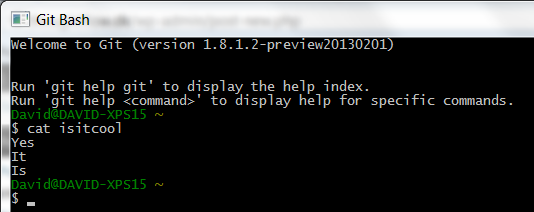
    The other day, I set out on a journey to get many of the wonderful Unix tools running on Windows in something that resembles a terminal. In case you did not know, you can come a very long way by installing msysgit. It includes a terminal called Git Bash and all the common Unix tools such as sed, grep, awk, perl, find and so on. It also includes an ssh client and curl. I have been using this for about a year now and it is quite convenient when you are forced to work on a Windows machine. I know Windows has Powershell but… I just do not like it.

    Git Bash

  • Ubuntu — so ready for developer time

    In my previous post, I said that Ubuntu is not ready for primetime. I still think this is the case for most people. However, since writing the post I have acquired a Dell XPS 13 with Ubuntu 12.04 pre-installed (they call it a “developer edition“). Let me tell you, it is an absolute joy to work with and there have been no problems so far. Everything just works.

    Finally, I should note that I have been using Ubuntu extensively for development in recent years. I have just usually been running it in a virtual machine where there is no “weird” hardware present (such as optimus). My server that hosts this website is also running Ubuntu. So maybe it sounds a little harsh when I say it is not ready for primetime because it is definitely ready for developer time.

  • Ubuntu — not ready for primetime

    I wanted to install Ubuntu on my Dell XPS 15 to try out Steam for Linux. This was not the enjoyable experience I had hoped for since a lot of things did not work perfectly out of the box. Below are some steps I had to take to get the system going.

    Fixing the graphics

    My laptop has NVIDIA optimus technology which automatically switches between Intel’s HD 4000 graphics card and the faster NVIDIA Geforce GFX 640. Apparently, optimus support on Linux is not good.

    In Ubuntu, I had no 3D support and the graphics would spontanously turn off after a restart so I was presented with only the terminal. Fortunately, there are some nice people that are maintaining a project called Bumblebee which adds support for optimus in Linux. After installing this, my graphics system has been fairly stable. Just do this:

    sudo add-apt-repository ppa:bumblebee/stable
    sudo add-apt-repository ppa:ubuntu-x-swat/x-updates
    sudo apt-get update
    sudo apt-get install bumblebee bumblebee-nvidia linux-headers-generic
    

    I also recommend the primusrun package:

    sudo apt-get install primus
    

    With the above installed, it is possible to run programs specifically with the NVIDIA card like so:

    optirun glxspheres
    primusrun glxspheres
    

    Fixing the mouse

    Yes, the mouse did not work. Well, the touchpad worked but my wireless Logitech M705 mouse did not. The problem, it turned out, was the Logitech Unifying Receiver. It is a small USB thing that is plugged in for a mouse and external keyboard and is used for many Logitech devices. After searching for many hours, somewhere on some forum, I found the following simple command-line trick:

    #!/bin/bash
    while :; do dmesg|grep logitech-djreceiver|tail -1|grep -q -c "failed with error -32" || exit; echo -n `date`" Driver Reload" ; rmmod hid_logitech_dj ; modprobe hid_logitech_dj ; dmesg|grep logitech-djreceiver|tail -1 ; sleep 1; done
    

    You can also find it as a github gist here.

    The script simply tries to reload the receiver with modprobe and it works. Sometimes after one loop, sometimes after ten. And it is a pain in the ass to run it at every startup.

    Getting Steam to work

    The real reason I wanted to try Ubuntu again was the recently released Steam for Linux client. After installing Bumblebee, Steam actually installed and ran quite well. However, it is worth taking a look at this guide for running programs with optirun/primusrun.

    Conclusion

    In the above, I left out the fact that before finding the solutions, I had to reinstall Ubuntu three times because of playing around with graphics drivers that broke the system until finally figuring out about the Bumblebee project. This is definitely something most users would not want to mess around with. Not only that but my mouse is still not working after a restart and sometimes I am still greated with the terminal login instead of a graphics login. It is quite random, actually.

    I should also note that I have had similar experiences with Ubuntu in the past. I love Linux but it just does not work like Windows or Mac. As soon as you are faced with a weird hardware problem, good luck fixing that without the command-line!

    Therefore, I have to recommend not installing Ubuntu at the current time — at least if you have dual graphics card with optimus technology or you are not willing to spend hours trying to fix things. It is a big shame because the Linux platform and Ubuntu in particular shows great promise. But it is not for everyone. It is not ready for primetime.

  • An SMTP server for testing

    Today I needed to send some test emails from my application and I searched around for a very simple SMTP server that can save outgoing emails to a folder instead of actually sending them. This is nice for debugging and testing email functionality in an application.

    Unfortunately, it was very difficult to find something useful. In the end, I found a very simple script that did the trick. I forked it and added some command-line options so now I can easily run a simple SMTP server on my development computer in Linux, like this:

    dummy_smtp.py -p 8081
    

    In case you were wondering, this works really well with the Google App Engine mail API. Simply run the development server like this:

    dev_appserver.py --smtp_host=localhost --smtp_port=8081
    

    The source code for the server is right here:
    https://github.com/dlebech/Dummy-SMTP

  • Creating a Shopify plugin

    This post is about Antecons, a product recommendation engine, now part of Conversio. Antecons is no longer commercially available, but I have kept my developer diary on my website with permission.


    In the last post about Antecons, I wrote about frequent patterns and MapReduce. Since then, this base functionality has been tweaked to work a little better but the main focus has been on creating the first plugin for Antecons: A Shopify app.

    I have previously mentioned that it is important to me that Antecons can be easy to set up. Although focusing on the API initially was a great way to get started, it has become clear after some thought that the reach is limited if the entire product is just an API from the beginning. So I have begun implementing a plugin (or an app as they call it) for Shopify. There are two reasons for choosing Shopify as the first integrated platform for Antecons:

    1. It is easy to get started with app development on Shopify and their API is quite extensive.
    2. Shopify was simply something I knew before-hand so I did not need to research other options too much.

    So far, it has been a good experience working with the Shopify API. Integrating with Python/Google App Engine was very easy thanks to their open source API bindings for python.

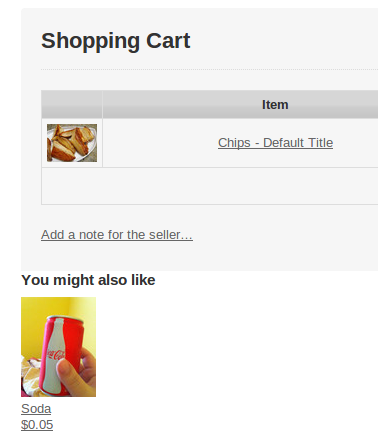
    The Shopify app for Antecons is not finished yet or at least, I do not consider it in a state where I can release it. However, it is in state where it installs correctly and delivers recommendations to the webshop it is installed on. Instead of writing a lot about that, below are some screenshots that show the functionality. The suggestions by Antecons are the little “You might also like” products.

    Antecons installation start
    Antecons installation start
    Antecons app authentication
    Antecons app authentication
    Antecons installed
    Antecons installed
    Product page suggestion
    Product page suggestion
    Cart page suggestion
    Cart page suggestion